Reference lexicons
Scoring a stage against attested or reconstructed forms, and finding the change behind a difference.
A lexicon lists entries, cited from a source or written by you, and is marked attested or reconstructed. On the first stage of a root line, the line starts from it. On a later stage, the stage is scored against it: each entry gives the expected form of a word there, and the Score tab sets it against the form the line derives.
The Latin to Castilian demo has a scored stage. Create a project from it to follow along: Modern Spanish is scored against Modern Spanish attestations.
Make a lexicon
- Press + beside Lexicons in the sidebar.
- Fill in Name, choose Attested or Reconstructed under Evidence, list the sources one per line, and press Create.
- Press Add an entry and type the form in IPA and its gloss. The entry saves once it has a form.
An entry finds its word by its gloss and by the features ticked Beside the word on the Features screen, every feature marked Paradigm among them. ˈluna glossed moon finds the word glossed moon.
An entry with a form alone saves too, so you can note forms and give them meanings later. In the lexicon a line starts from, it is a word named by its form. On a later stage it finds no word until it has a gloss, and the Score tab asks for one.
Score a stage
- In the editor, press the name of the stage. Its settings open.
- Under Scored against, press the lexicon. Lemula says how many entries it matches against the words the line derives there.
- Press Attach.
A stage is scored against one lexicon, and attaching another takes its place. Attach saves at once, as a form recorded from the matrix does, and the Score tab and the counts follow. To detach, press No lexicon, then Detach. On the lexicon's screen, Attach to stages does the same for any stage of the project.
Under Mode, Compare keeps the derived forms. Replace puts the expected form in their place, and later stages derive from it. Also compared adds features to the check: with Part of speech pressed, a word with the right form and another part of speech diverges. Mode and Also compared save a second after you set them, as every edit in the editor does.
Read the Score tab
Press the name of the stage and open the Score tab. Each word and entry lands in one of four groups:
- Agree: the line derives the form the entry gives.
- Diverge: the line derives another form, shown first, with the expected one after ✕.
- Missing: the entry found no word at the stage, or several, and the row says which.
- Not in lexicon: the line derives the word, and no entry names it.
Modern Spanish in the demo has 43 Agree, 2 Diverge, 2 Missing and 2 Not in lexicon. Cat diverges as ˈkato ✕ ˈɡato. Moon and daughter are missing, and their rows say No word at this stage carries these features.
For a Missing entry, Add to starting lexicon makes it a starting word with the form you give at the root stage, and every change of the line runs over it. Add note writes a note on the entry, such as which change should have produced the word. The note is saved with the project at once, whatever the draft holds, and shows under the entry.
Press Notes in the sidebar to see every note of the project, by line and stage. A note says Missing while the line still does not derive its word, and Derived now once it does. Close it when it is answered. A note whose entry, stage or lexicon is gone moves to Detached and keeps the stage and line it was written at, until you close or delete it.
The matrix shows the counts beside the stage's name, as 43 ✓ 2 ✕ 2 ∅. Under Full line, the editor's header adds up every scored stage of the line: 2 divergences · 2 missing.
Follow a divergence
Press a row in the Score tab. The word gets a column in the matrix, and its history opens beside it with every change that touched it and the rule that did. Cat goes from ˈkattu to ˈkato by {pp,tt,kk} > {p,t,k} and u > o / _#. No change voices its first consonant, and that is where ˈɡato differs.
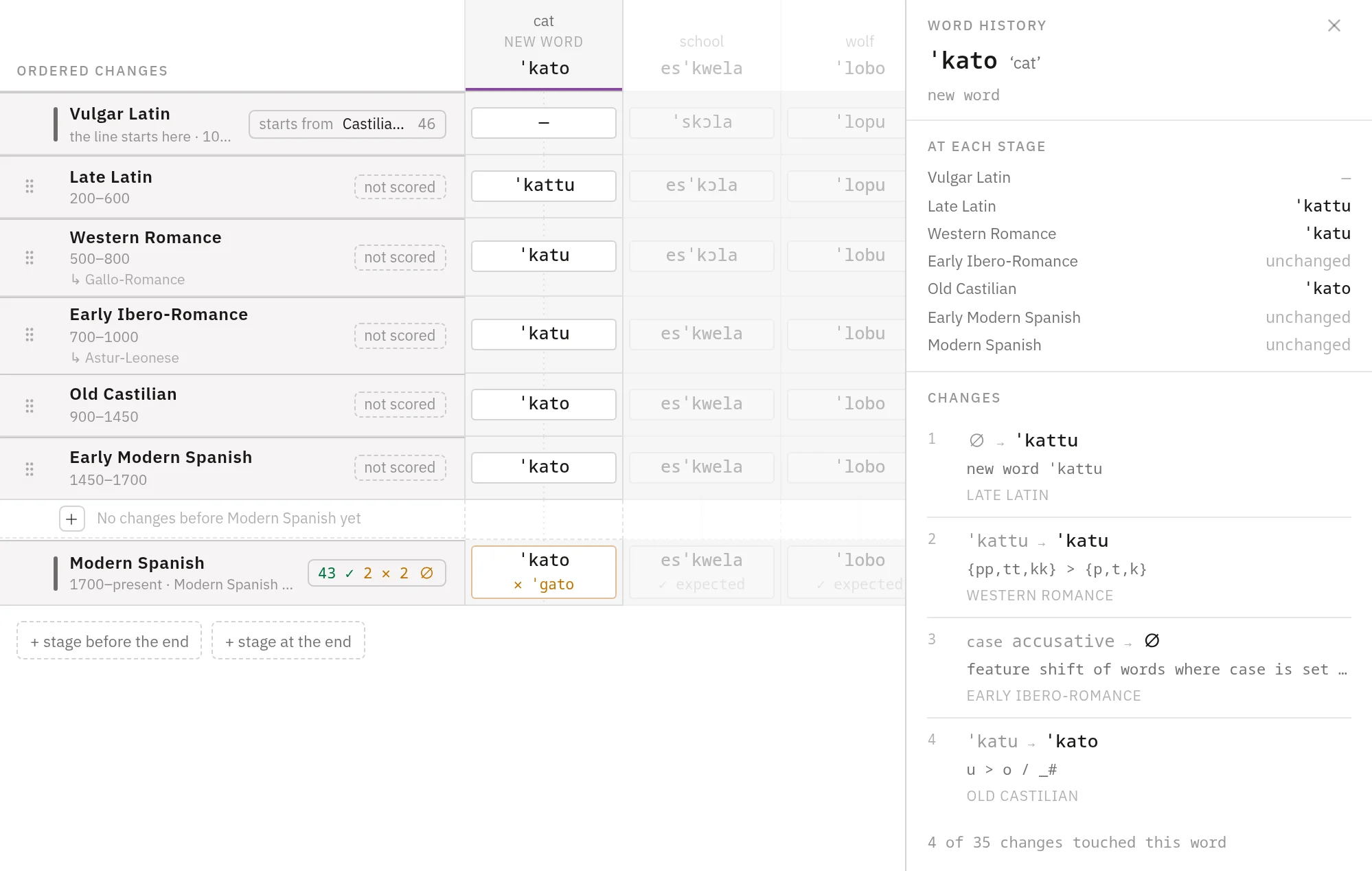
On a scored stage, each cell shows the expected form under the derived one: ✓ expected where they agree, and ✕ ˈɡato where they differ. Press it to open Correct cat, which edits the entry in the lexicon or deletes it.
Words that enter later
The score reads every word the line has at the stage, whatever change brought it in. Oil is a borrowing from Andalusi Arabic that enters at Old Castilian. Modern Spanish attestations has no entry for it, so it lands in Not in lexicon. To give it one:
- Press oil under Not in lexicon. It gets a column in the matrix.
- Point at its cell on the Modern Spanish row and press + expected form.
- Type
aˈθejteand press Record.
The entry goes into Modern Spanish attestations, and oil moves to Diverge. An entry recorded from the matrix names its word, so it finds that word whatever the gloss.