Orthographies and spellings
Tables that write sounds in letters, where their spellings show, and the spellings a lexicon gives a word in place of the rows'.
An orthography is a table that says how sounds are written in letters. Lemula spells every form of a stage or lexicon by it and shows the spelling beside the IPA. An orthography writes forms and nothing else, so it never changes what the rules derive. The examples come from the Russian sample, which is written in Russian Cyrillic.
Make an orthography
- Press + beside Orthographies in the sidebar, fill in Name and press Create.
- Give it rows. Sources of sounds takes them from a lexicon, an inventory or a stage, one row for each sound. Pick sounds from the IPA chart adds rows from the chart, and Add a row adds an empty one.
- Type the letters for each row. Fill letters from common practice writes them for you in the style you choose: Latin with digraphs, Latin with diacritics, or Cyrillic. It fills rows of one sound and leaves rows of several sounds as written. Tick Replace existing letters to write over letters you typed.
The table saves a second after your last edit. The toolbar shows Saving…, then Saved.
A source stays listed in Sources of sounds. Update from sources reads each one again: a new sound gets a row, a row with no letters whose sound no source has any more is removed, and a row that has letters keeps them and is marked.
Rows
A row has the sounds it writes, the letters it writes them with, and an optional environment. Lemula spells a form from left to right, and at each point takes the longest run of sounds a row writes. Among rows of the same length, the first whose environment holds wins, and a row with no environment covers the rest.
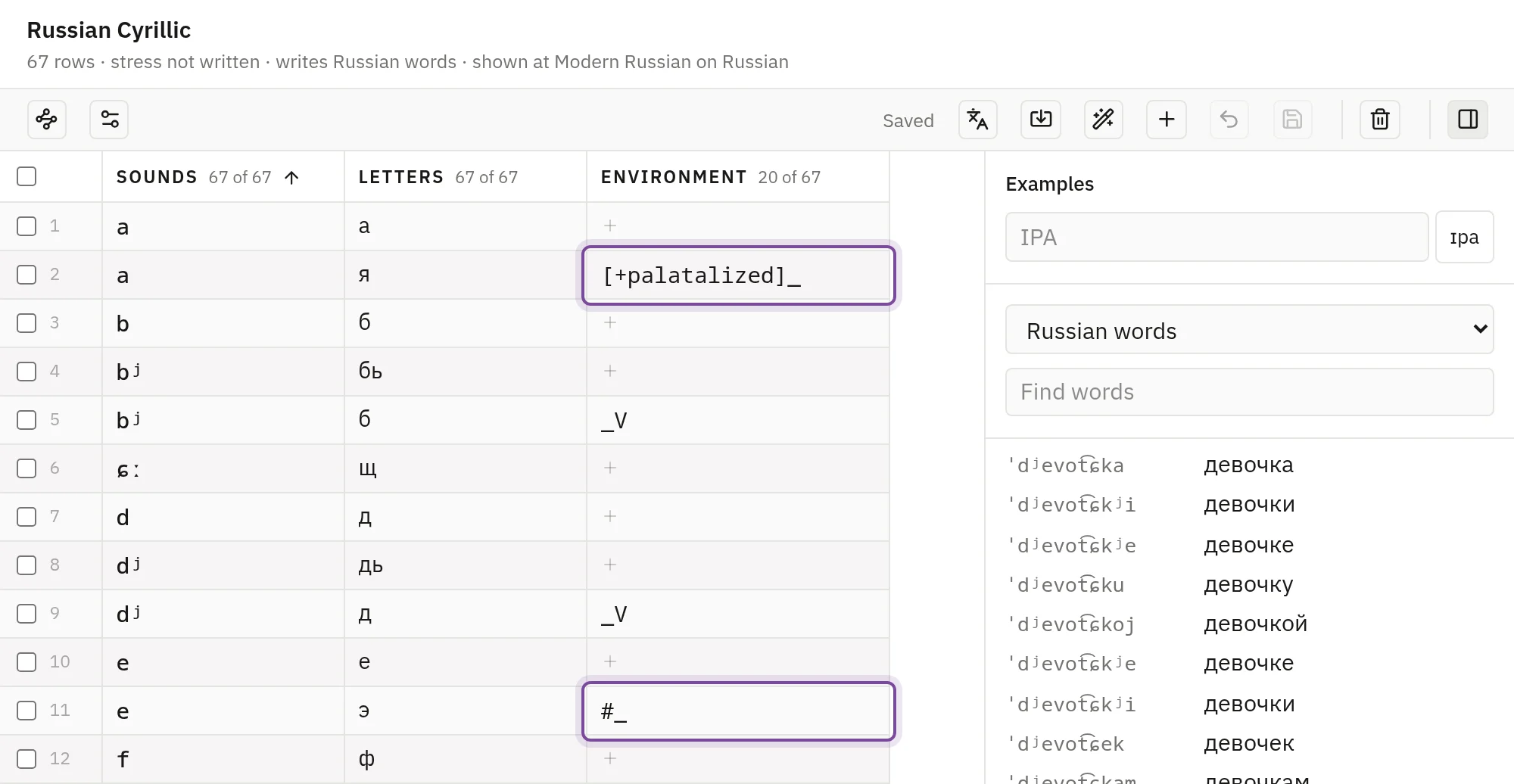
The environment uses the notation of a sound change: _V before a vowel, #_ at the start of a word, [+palatalized]_ after a palatalised consonant. In the Russian table, a is written а, and я after a palatalised consonant. A row of several sounds, such as ks written x, is always written by hand.
A row marked in red has to be fixed before the table can save: it has no sounds, holds a space, runs too long, repeats another row, or has an environment that can't be read. Pointing at a marked row says what is wrong. A row with no letters yet saves as written and leaves its sound in IPA, marked as unspelled.
Show examples opens a panel beside the table. Type IPA at the top to see it spelled, or read the words of a lexicon with their spellings as the table stands.
Orthography settings holds the Name, how Stress is written (Not written, or an acute over the stressed vowel) and the order the rows sort in.
Where spellings show
Choose lexicons and stages, in the toolbar, lists every lexicon and stage of the project: tick the ones written in this orthography. A stage can also take one in its Settings, under Orthographies. Each stage lists its own, so a stage that lists none shows IPA.
A stage or lexicon can be written in several orthographies, as Serbian is in Cyrillic and Latin. Where there is room for one spelling, as in a cell of the matrix, the first in the stage's list is shown; move them up or down to change it. Attaching, detaching and moving save at once.
Spellings appear beside the IPA in lexicons and stages, in examples, on the public pages and in CSV exports.
Written spellings
Some words are written otherwise than their sounds would be. Russian writes нового for ˈnovovo, where the rows would write новово. A lexicon can give such a word its own written spelling.
A lexicon written in an orthography has a column for it after the form. An empty cell shows the spelling the word has there, in grey: its form as the rows spell it, or a spelling it carries from an earlier stage. To give it one of its own, press the cell, type the spelling and press Done.
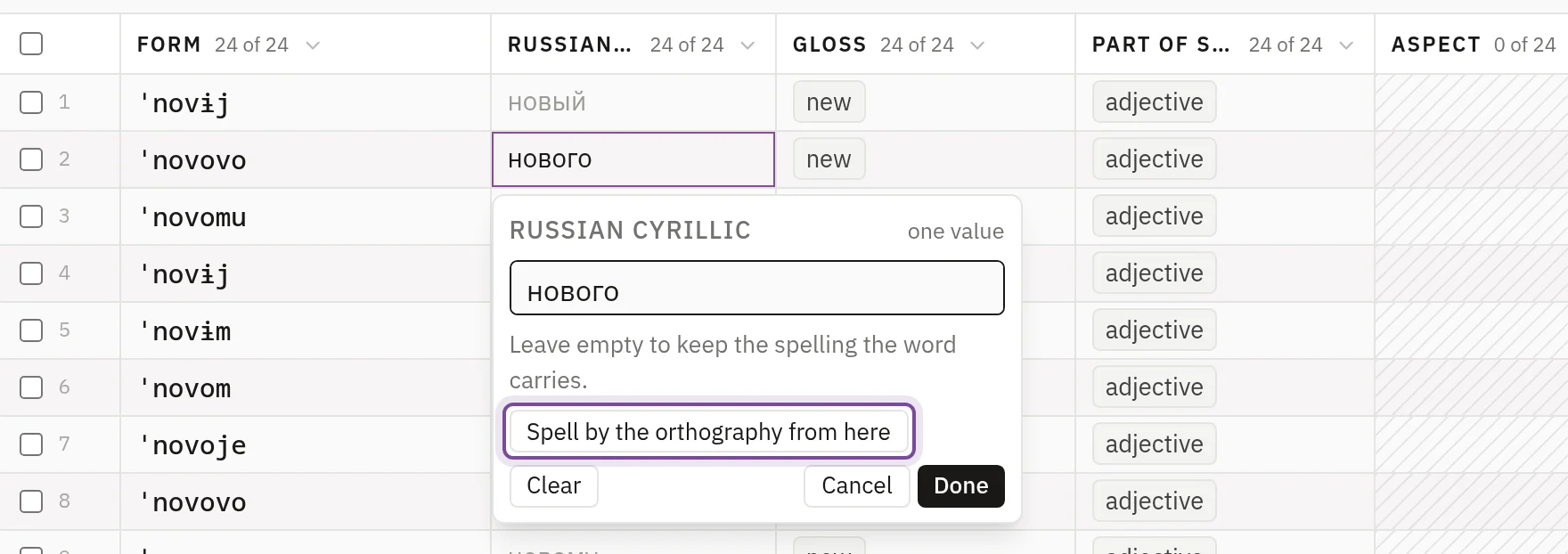
From the stage the lexicon is attached to, the word keeps the spelling at later stages and on the branches that split later, while they are written in the same orthography. Sound changes leave it alone. It stops at a stage written in another orthography and where the word is lost.
A later lexicon can give the word another spelling, or return it to the rows with Spell by the orthography from here. The editor underlines a written spelling with dots where the rows would write it otherwise, and pointing at it says where it was written. A letter no row writes is flagged and still saved, since a historical spelling can keep letters no sound has.
In a CSV file, written spellings go in a written: column for each orthography. See CSV import and export.