Features
The properties every entry and word can carry, declared once for the project, with their values, gloss labels, defaults and the words each is asked of.
A feature is a property an entry or a word carries, such as its part of speech, its case or its gloss. The Features screen declares them for the whole project. Each one becomes a column of every lexicon, and conditions, paradigm tables, example glosses and public pages read them. The examples come from the Russian sample.
Open Features in the sidebar, under Project. Edits stay on the screen until you press Save features, and Revert drops them.
Add a feature
Press + Feature under the table, and fill in its name. The key comes from the name: Word class gets word-class. Entries and CSV files store values under the key, so it can't change once an entry holds the feature.
The row under the table also offers common features ready-made. Grammatical adds Case, Number, Gender, Person, Tense, Aspect, Mood, Voice or Definiteness with its usual values and their gloss labels, marked Paradigm and asked of the parts of speech that have it. Its values stay suggested, so you can add your own. Annotations adds a Translation or a Definition. A ready-made feature is an ordinary row: change any of it.
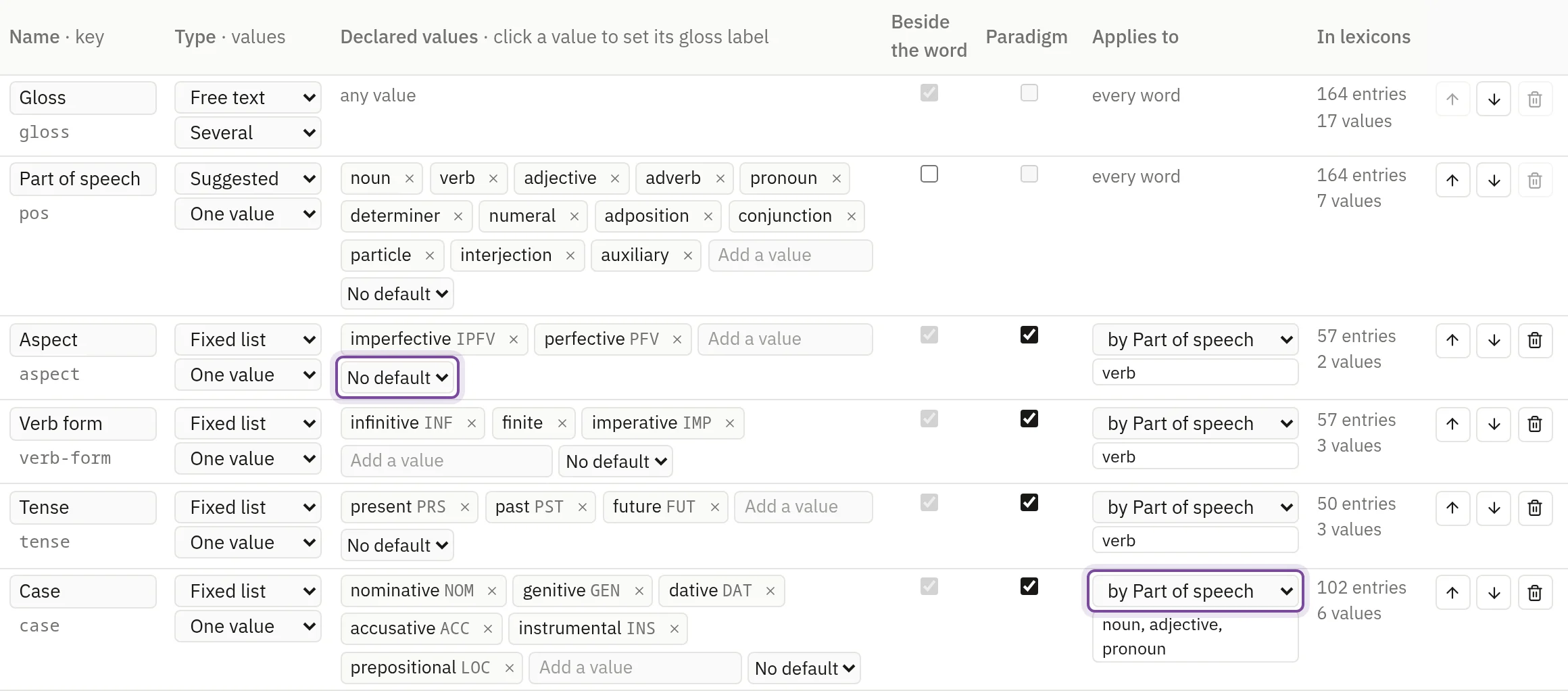
Types and values
Type decides which values a feature takes. A Fixed list allows only its declared values. Suggested offers its values and takes new ones. Free text takes any value. An Annotation is free text shown beside a word, such as a definition, and rules never read it. See Value types.
The second menu says whether an entry holds One value or Several. A gloss can hold several, as moon | month does.
Type a value into Add a value and press Enter to declare it, or × to remove it. Where the lexicons already hold values the feature doesn't declare, the row lists them under Used, not declared, and a click declares one or all of them.
Gloss labels
A value of a fixed or suggested feature can carry a gloss label, such as NOM for nominative. Example glosses use the labels to find words: wolf-NOM finds the word glossed wolf whose case is nominative.
A value gets its label when you declare it: the abbreviation of the Leipzig Glossing Rules where the value is a standard term, or the value itself where it is written in capitals or digits, such as 3SG. Other values get none, and so do the values of Part of speech. Click a value to write or change its label, and press Enter.
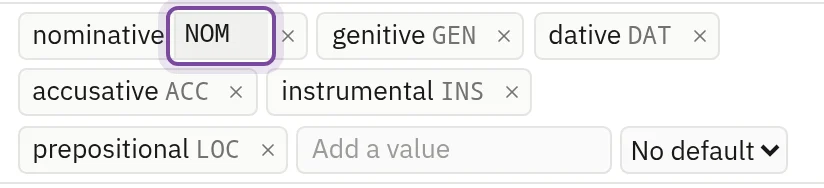
A label stands for one value across the project, and letter case counts. It can't hold a space, a hyphen or a dot, since those separate the parts of a gloss. A value without a label can't be written in a gloss.
Defaults
The menu after a feature's values names its default: the value a new entry or word gets. Choose No default for none; free text and annotations have no default. A default fills a new lexicon row, a lexeme added in the Paradigm view and a new word or borrowing written out by hand, once the feature is asked of it: Case asked of nouns is filled when the part of speech becomes noun. Entries you already have and rows a CSV import adds keep what they hold.
Applies to
Applies to says which words a feature is asked of. Every word is the start. To narrow it, choose another feature and the values under which this one is asked: in the Russian sample, Case is asked of nouns, adjectives and pronouns, and Tense of verbs.
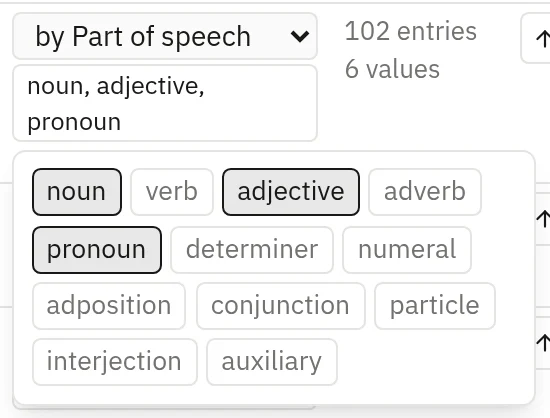
A word the feature isn't asked of can still hold it. The lexicon leaves its cell blank without offering to fill it, an entry's form keeps the field out of the way, and a default doesn't fill it. Paradigms builds a part of speech's tables from the features asked of it.
Beside the word and Paradigm
Beside the word shows a feature's value next to the word in the editor, so words with the same gloss read apart. It also decides how a lexicon's entry finds its word: by its gloss and the features ticked here. The gloss is always shown.
Paradigm makes a feature an axis of the paradigm tables, and a feature marked Paradigm is always beside the word. The gloss, the part of speech and annotations can't take the mark. See Paradigms.
Translation on public pages
The menu above the table chooses the annotation that public pages show in place of the gloss. New projects start with one called English. Words without a value show the gloss, and the pages change when you publish again. See Translation.
Order, use and removal
The order of the rows is the order of a lexicon's columns and of the values after the gloss. Move a row with its arrows. In lexicons counts the entries that hold the feature and how many values they use.
The trash button removes a feature. Its entries keep their values, and nothing shows them; the screen says so before you save. Gloss and Part of speech can't be removed. A change the entries would break can't be saved, and its row says how many entries it breaks: a fixed list that leaves out a value they hold, or One value where they hold several.
Inventory columns, the screen's second tab, declares the columns of every inventory, each with a name, a key and a type.