Examples
Sentences written once as Leipzig glosses and read at every later stage in the forms the line derives there.
An example is a sentence with its translation and comment. Its words are glosses written at a stage of a line, one for each word. At every later stage each gloss finds the word of the line that says it, in the form the rules derive there, so the sentence changes with the language. The Latin to Castilian demo has six examples to follow along with.
The Examples screen
Open Examples in the sidebar, under Project. The screen reads every example at one stage of one line: choose them under Line and Stage, or step through the stages with the arrows beside Stage.
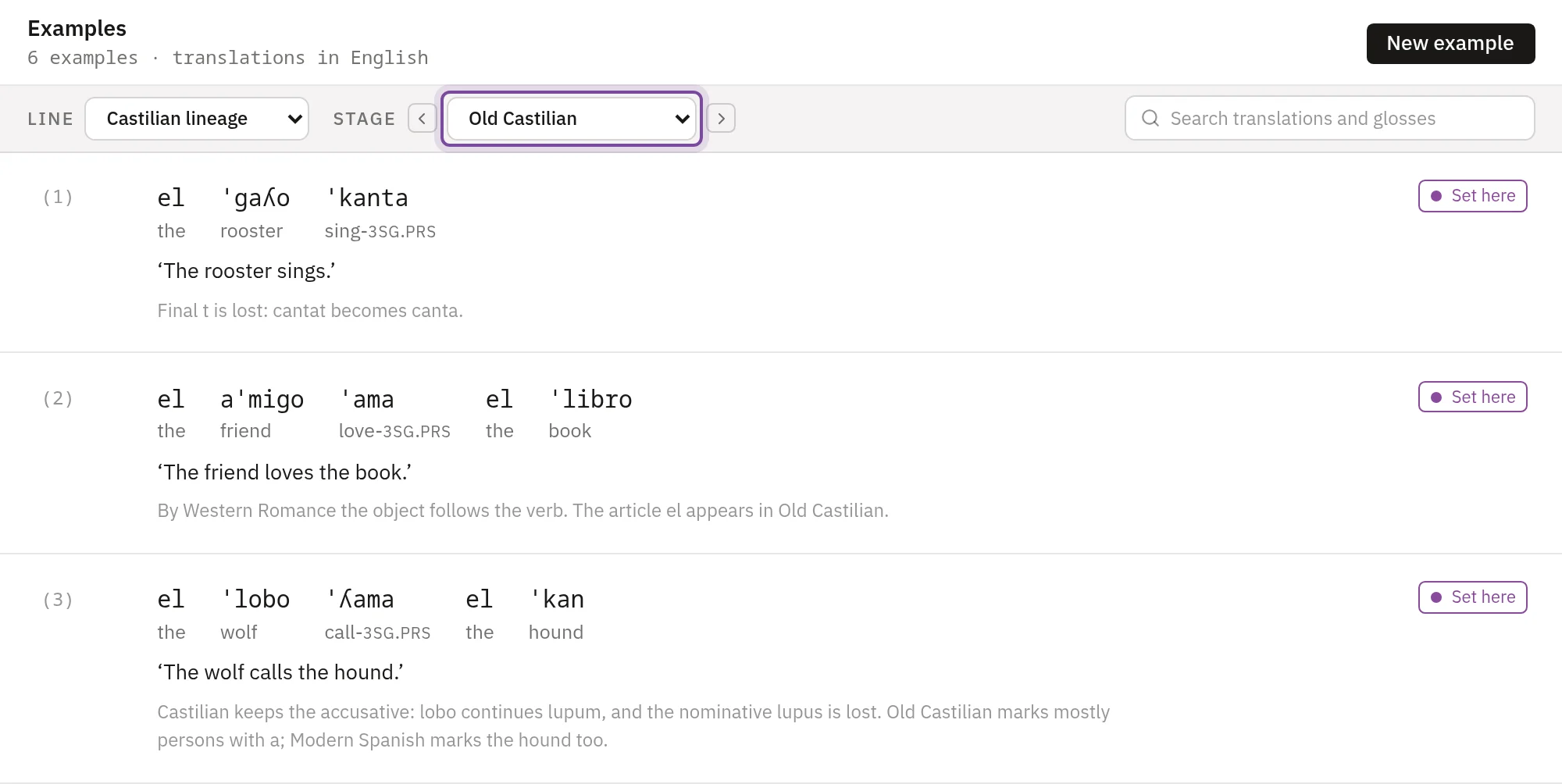
The chip beside an example says where its words come from: Set here, or From and the stage where they were set. A gloss that finds no word at the stage reads as written, underlined with dots, as Marcus does in example 4. A gloss that finds several words shows their number in a dashed box. The bar under the list counts both.
Where the stage is written in an orthography, Forms switches between IPA, Spelling and both. The search box finds examples by translation and gloss. To change the order of the examples, drag one by the grip beside its number. The order holds at every stage.
A stage's window has an Examples tab that reads the same examples at that stage.
Write an example
- Press New example. Its window opens at the line and stage the screen shows.
- Under Translation, type the sentence in the field named after the project's translation feature, English in a new project.
- Write a Comment if you want one. It goes on the public pages.
- Under Words at the stage, type a gloss for each word, separated by spaces:
wolf-NOM hound-ACC call-3SG.PRS.
The window saves the example a second after you stop typing, and again when you close it. A save that fails says why at the bottom of the window and keeps what you typed, and closing the window then asks before it discards that. A project with no translation feature has no Translation field, and the window says to choose one on the Features screen.
A plan sets how many examples a project holds: 50 on the Free plan. Plans lists the others.
How a gloss finds its word
A gloss is split at hyphens and dots. A part made of gloss labels stands for feature values, and the rest is the word's gloss. wolf-NOM finds the word glossed wolf whose case is nominative. Labels written together, as in 3SG, are split by the labels the project has, and letter case counts.
Hyphens and dots tell you how the forms are built. The lookup reads past them, so call-3SG.PRS and call-3SG-PRS find the same word.
Under the field, each gloss gets a card with the form it finds at the stage. A card with a dashed edge found no word, or several, and says which.
A word with another value of a labelled feature is never found. A word without the feature can be, and among the words with the gloss, those that lack the fewest labelled features are the ones found. The demo's nouns lose case at Early Ibero-Romance, so from there wolf-NOM finds the word glossed wolf and reads wolf: the label drops out with its separator.
The labels are set on the Features screen, where a declared value gets the standard Leipzig abbreviation when it has one. See Features.
Pick a word
Put the caret in a gloss, or press its card, and a panel opens under the cards. Words lists the words with that gloss at the stage, each with the labels that tell it from the others. Press one, and the gloss is rewritten with those labels so that it finds that word alone. Each feature of those words follows with its values, and pressing a value puts its label in the gloss or takes it out.
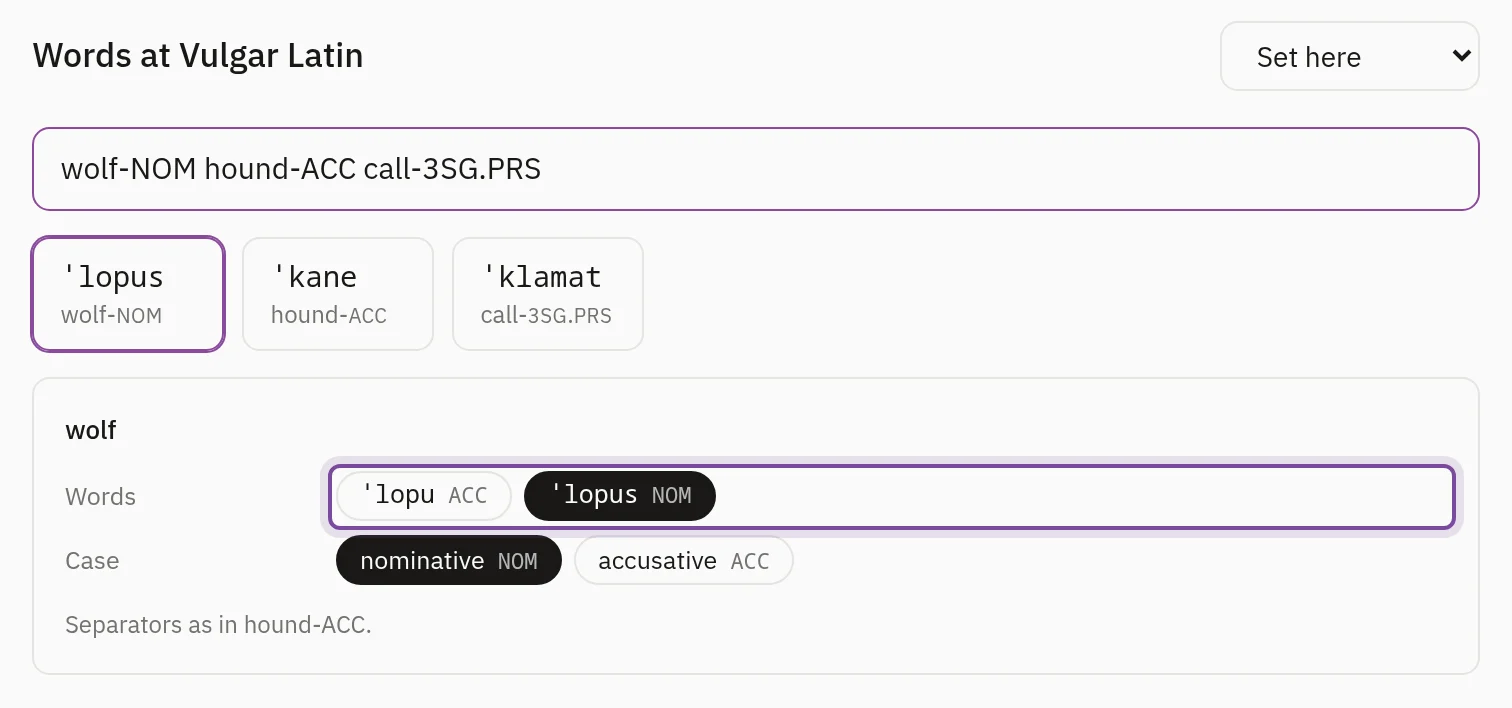
The labels go in with the separators the line last used for the same features, and the note at the foot of the panel names the gloss they follow, as hound-ACC here. Where no other gloss on the line has those features, a hyphen goes before each label.
A word no labels can tell from another is shown dashed and can't be picked. Pointing at it says why.
Words at later stages
The list of stages beside the fields marks each stage where words are set with a filled dot, and each stage that inherits them with a hollow one. Every later stage inherits the words, and so does every line that splits later, until a stage sets new ones. The note under the field says where that is.
Where the word order or the words change, choose that stage in the list and press Set new words here. The field starts from the inherited words, ready to edit. To go back, choose Inherit in the menu beside Words at the stage. In the demo, Western Romance puts the verb before the object, Old Castilian adds the article (the wolf call-3SG.PRS the hound), and Modern Spanish marks the hound with a, which contracts with the article (the wolf call-3SG.PRS to.the hound).
A stage before the first words are set has none, and the screen says at which stage they start. A branch reads its parent's words at the stages it inherits from the parent; open the parent line to change them there. Deleting a stage or a line lists the examples whose words move or go before you confirm.
History and Lines
The History tab reads the example at every stage of its line and marks where words are set.
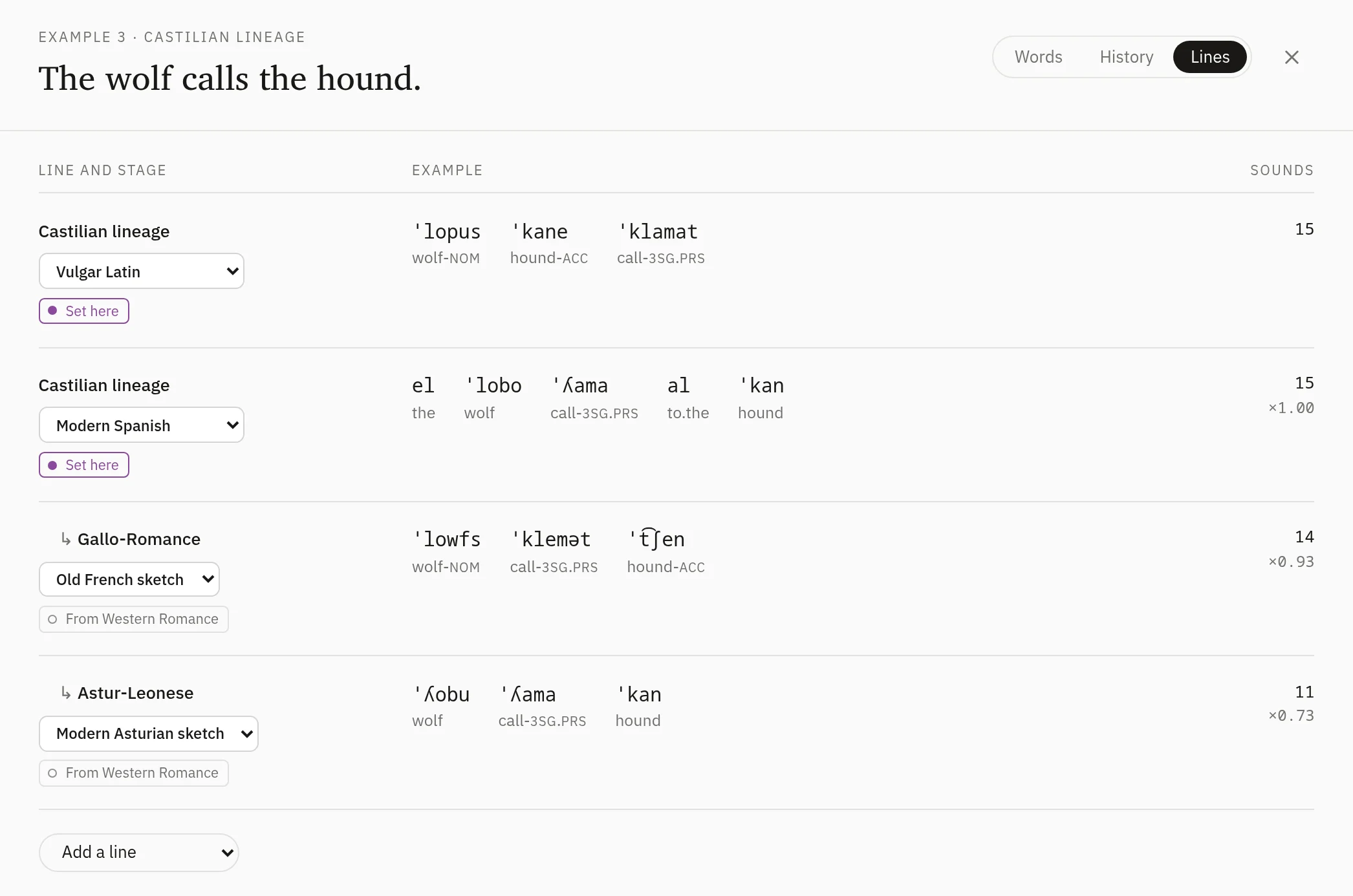
The Lines tab sets the example side by side on several lines. It opens on the first stage of the root line and the last stage of every line. Choose another stage in a row's menu, add a row with Add a line, or point at a row and press × to remove it. Sounds counts the example's sounds where every gloss finds one word, and the figure under it compares the count with the first row's: ×0.73 has about three quarters as many.
On the public pages
A line's public page lists its examples, and each example has a page with the sentence at every stage of its line. A change to an example reaches the pages when you publish again. See Publishing.
Sound change and analogy
What a paradigm does when a sound change reaches it, how analogy replaces a form, and what a word left without sounds looks like.
Orthographies and spellings
Tables that write sounds in letters, where their spellings show, and the spellings a lexicon gives a word in place of the rows'.